
A second brain is just one place that holds everything you would otherwise forget, so you look things up instead of straining to remember them. The blocker is the sorting, and filing 200 scraps by hand is exactly the job the prompt below hands off.
You can build a second brain in Notion by pasting all your messy notes into one AI prompt that sorts them into databases and tags, ready to copy in.
Most second brains fail for one reason: people build the empty container and never fill it. So the first move is to stock the shelf. Get five real things into it on day one, before you fuss over databases, because a brain with your actual notes earns its keep and an empty one becomes another app you abandon.
Work through these phases in order. You can get the first version standing today.
Phase 1: Gather the dump
Throw everything into one place first: notes, saved links, half-thoughts, screenshots you meant to deal with, the reminder you left in your phone. Open a blank note or a blank doc and paste it all in, one big pile, no tidying.
Do it all at once, not ten scraps at a time, because the AI can only group patterns it can actually see. A small batch hides the connections that make the structure obvious, so a note about a trip and a link about the same trip only land together if both are in front of it.
If you have already been catching ideas somewhere, this is where they come in. Capture with the parking lot, then file the pile here.
Phase 2: Create the databases in Notion
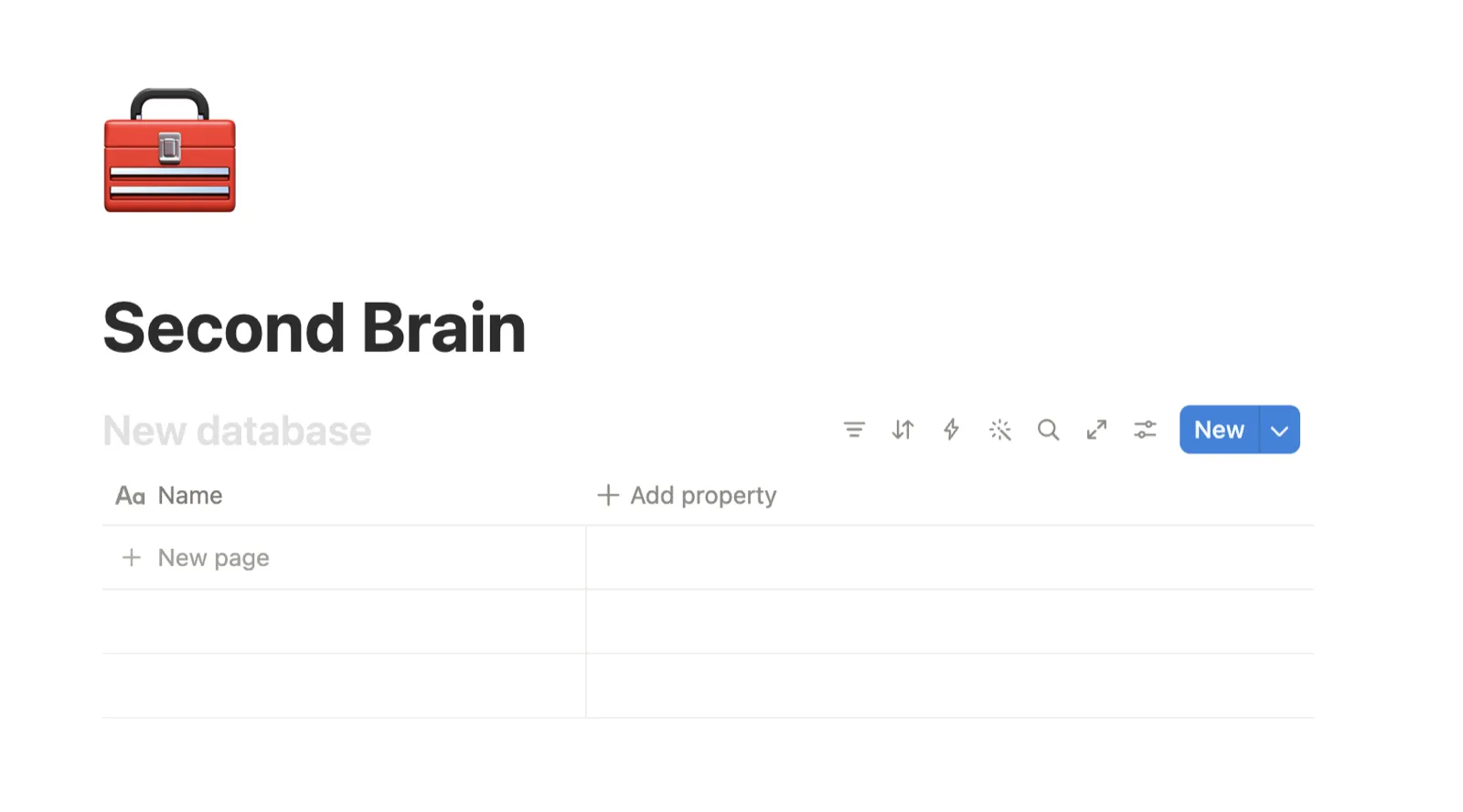
A database is just a table where each note is one row you can filter and search. You will make a few of these, then run the sorter in Phase 3 to fill them. Here are the exact clicks for a beginner.
- Open Notion and click New page in the left sidebar.
- Give the page a name, like Second Brain.
- On the empty page, type
/tableand choose Table view, then pick New database. That makes your first database. - To add a column, click the plus sign to the right of the last column heading.
- Pick what kind of column it is (a property), like Select for a tag you choose from a list, or Date for a date. A property is just a label on a note.
- Repeat for each property you want, using the starter list below.
Not sure what columns to make? Start with this list and change it later. Each note gets at least one tag from these.
- Type for what kind of thing it is (note, link, task, idea).
- Status for where it is up to (new, doing, done, parked).
- Project for which bit of your life or work it belongs to.
- Date for when it landed or when it matters.
- Link for the URL, if the note came from one.
You do not need all five in every database. Three good ones beat five you never fill.
Phase 3: Run the Brain Dump Sorter
Now hand the pile to AI. Paste the prompt below into Claude or ChatGPT. It opens with a short MY SECOND BRAIN block: fill that in once, so it files the way you actually search later, then paste your raw dump from Phase 1 underneath where it says to.
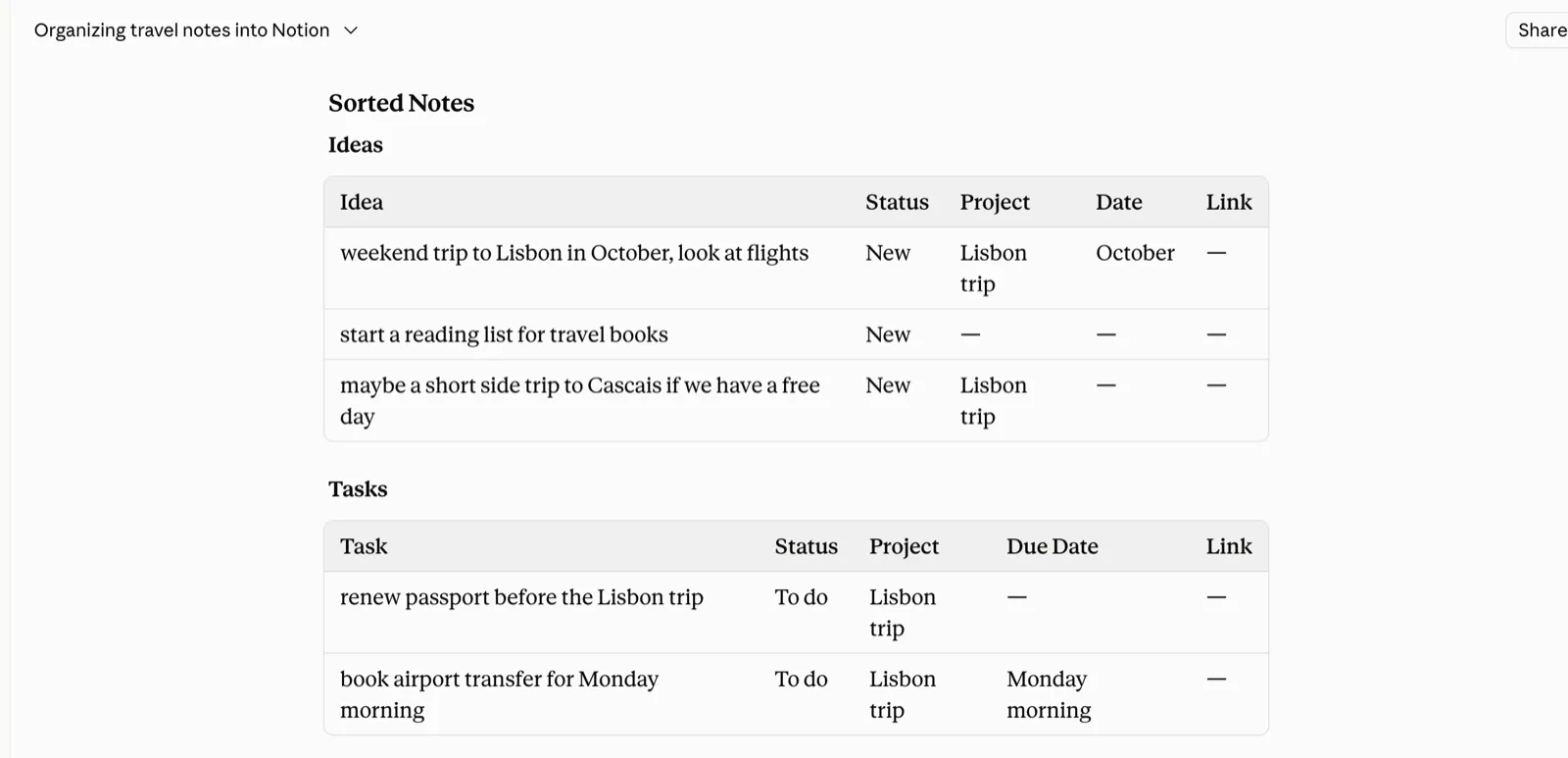
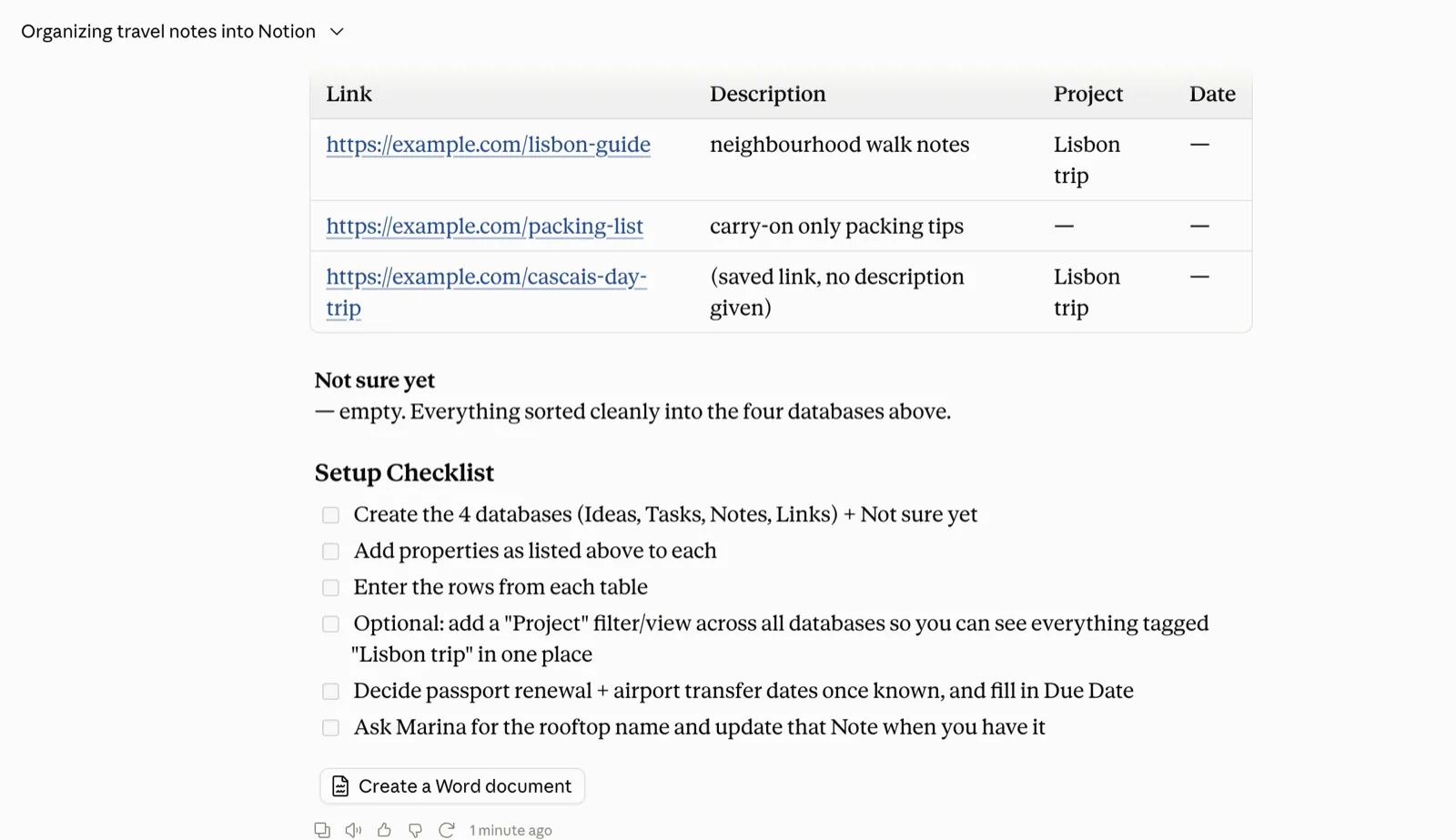
It reads the whole thing, proposes three to six databases, lists the properties each one needs, sorts every note into a row, and parks anything that does not fit in a "Not sure yet" pile. At the end it gives you a short setup checklist.
You are my librarian, the one who has to find this again for me in six months. I file things in a hurry and then forget the exact words I used, so your whole job is to put every note where the future me will actually go looking for it, not where it technically belongs. What is at stake is simple: a note filed in the wrong place is a note I have lost, even though it is sitting right there. Get the shelving right and I trust the whole system and keep feeding it. Get it wrong a few times and I quietly stop opening it. So think like someone shelving a library that one specific person has to search, months from now, half-remembering what they called things.

I am going to paste a messy dump of raw notes, links, and half-finished thoughts below. Turn it into a clean, searchable Notion setup: a few databases, every note filed as a row, tagged so I can filter it back out.

MY SECOND BRAIN (fill in once, then keep it in mind every time I bring you notes):
- What I use it for: [the real job it does, e.g. one place for everything to do with my freelance design work and my personal projects, so I stop losing links and half-ideas across my phone and three apps.]
- The areas of my life it covers: [the few real corners, because these become the databases, e.g. client work, my own side project, things to read and watch, home and life admin, people I want to keep track of.]
- How I go looking later: [the actual phrases I type into search when I want something back, e.g. "the thing about the Berlin trip", "that book Sam mentioned", "the pricing note from that client call". File so those searches land in one place.]
- The tags I actually use: [my own labels, e.g. Type (note / link / task / idea), Status (new / doing / done / parked), and a Project name. If I have none yet, say so and suggest a simple set.]
- What tends to pile up: [the kinds of scraps I dump, e.g. saved links I never read, voice notes I typed out later, screenshots, one-line ideas at 2am. If a kind of thing has no obvious home, I want to know.]

YOUR JOBS:

1. SORT THE BRAIN DUMP. When I paste a dump: read the whole thing first, before you file a single note, so you group by real patterns and not by the order I happened to paste. Then, if MY SECOND BRAIN above is blank or a key thing is missing, ask me at most two questions that would change how you file (which areas matter most, whether I want it split by project or by type) and wait for my answer. Otherwise, propose three to six databases, never more, each a plain-named table with one line on what it holds. A database is a table where each note is one row. For each, list the properties it needs (the columns and tags, kept simple: Type, Status, Project, Date, Link) with a few words on each. Then sort every note into the right database as a row and fill its properties, keeping my original wording for the note itself unless I ask you to change it. End with a short setup checklist: the databases to create in Notion, in order, and which properties to add to each, so I can build it.

2. DECIDE WHERE IT LIVES BY HOW I WOULD SEARCH. File each note where the future me would go looking for it, not where it literally belongs. A link about a trip and a scribbled thought about the same trip go together, because I will hunt for "the Berlin thing" in one place, not chase it across a Links table and an Ideas table. If a note could sit in two databases, put it where I would look first and add a tag that points to the other, so it turns up either way. When you finish a sort, say in one line the rule you filed by, so I can tell you if I would have searched differently.

3. SPOT WHAT IS MISSING. A note is only findable if it carries the thing I would filter on. As you file, flag any note missing the one detail that would let me pull it back later: no date on something clearly time-bound, no link on a "saved article", no project tag on a work note. Do not invent the missing detail. Tell me what is missing and on which note, then either ask me or leave the field marked clearly so I can fill it.

4. THE NOT SURE YET PILE. Put anything that does not fit cleanly into a database called "Not sure yet", with one line on why, so nothing gets forced onto the wrong shelf or quietly lost. Never guess a home just to make the sort look tidy. Five visible notes I still need to place beats five notes I can never find again.

5. THE WEEKLY TIDY. When I say "weekly tidy" and paste the notes that piled up this week, and tell you the databases I already have: sort the new notes into those existing databases, do not invent new ones. Only suggest a new database if something genuinely belongs in none I have, and say why before you make it. Keep it short: the rows to add, where each one goes, and anything you parked in "Not sure yet".

6. FIND IT AGAIN. When I ask for something back ("where's that book Sam mentioned", "what have I saved on pricing"), do not answer from memory. Hand me the exact Notion filter to run: which database to open, which property to filter, and the value to set, in one line I can follow, e.g. "Reading database, filter Status is New and Type is Book." If my question is too vague to land on one filter, tell me the single detail that would sharpen it.

RULES:
- Never invent a note, a date, a link, a tag or a detail I did not give you. If something is unclear, park it in "Not sure yet" and say why, or ask me one short question.
- Clarify before you file when it matters. If a choice would change where half my notes land, ask first rather than sorting the whole pile the wrong way.
- Keep every database name and property name plain enough that a beginner gets it at a glance. No clever labels I will not recognise in six months.
- Do not add databases or tags for things I did not mention just because they seem useful. Fit my life, not a productivity system.
- End every sort by naming the part you are least sure about: the note you nearly filed two ways, a database you were not certain I needed, or a tag you had to guess.

Here is my dump:
[paste all your notes, links and thoughts here]
Here is what one scrap turns into, so you can see the move on a single note. You paste in:
book rec from Sam - "Four Thousand Weeks", supposedly good on time
The sorter files it where you would look for it later, in your Reading database rather than a generic Links pile:
Note: Four Thousand Weeks (rec from Sam) | Type: Book | Status: New | Project: Reading | Link: none given Filed here because you would search "that book Sam mentioned", so a book rec sits with the other things to read. Least sure about: no link was given, so add one if you want to open it later.
Same words you wrote, now filed where you would hunt for it and flagged for the one thing it is missing. Multiply that by your whole pile and the structure builds itself.
Phase 4: Paste the rows into Notion
The AI has handed you a plan; now you copy it into Notion. Use the setup checklist it gave you at the end: create each database it named (Phase 2 shows the clicks), add the properties it listed, then work down the sorted rows and paste each note into the right table, filling its tags as you go.
Be honest with yourself about this part. For a small pile it is quick. For a real backlog of a hundred-plus notes it is more like an afternoon of copy-paste, because you are moving each row across by hand. Put a podcast on and get through it, because you only do the big catch-up sort once.
Ask your brain, once it is built
The payoff is what you get back when you ask it something. Ask it like a person who knows what they filed. A weak question, "what did I save about work?", hands you everything and nothing.
A sharp one, "in my Reading database, which notes are tagged pricing and still marked New?", hands you the three you meant. Name the database, name the tag, and the answer comes back tight.
Phase 5: Keep it alive (weekly intake)
A second brain rots if you only build it once and never feed it. So keep a small weekly ritual: once a week, paste the new notes that piled up into the same prompt, and tell it which databases you already have so it sorts into those instead of inventing new ones.
Add a line like "I already have these databases: Projects, People, Ideas, Reading. Sort into these where they fit, and only suggest a new one if something genuinely does not belong."
Ten minutes a week keeps it current, and current is the whole point, because a second brain you trust is one you actually check.
Common mistakes
- Inventing structure you do not need. Do not build eight databases for a life that fits in three. The fix: let the sorter propose the groups from your real dump, and delete any it suggests that you would never open.
- Not tagging every note. A note with no tag is a note you will never filter back out. The fix: give every row at least one tag as you paste it in, even if it is just Type.
- Pasting too little to see patterns. Ten notes give the AI nothing to group, so you get a weak structure. The fix: dump the whole backlog in one go, not a tidy sample.
- Trying to make AI build it inside Notion. The chat cannot click around your Notion and create the tables for you. The fix: treat the output as a plan you paste in yourself, which is Phase 4.
Where the line is
- The honest bit: the AI plans and sorts your second brain, it does not build it inside Notion for you. You still create the databases and paste the rows in yourself, and on a big backlog that is real work, closer to an afternoon than ten minutes.
- It can miscategorise the odd note, so skim the result once before you trust it. And it cannot read a link it cannot open, so paste the important text, not just the URL.
- When you search it later, ask narrow and name the database. AI and Notion pull what they judge most relevant, so a vague question gets a vague answer. See the ask-your-brain example above for the shape.
Set it up once
Copy the prompt, dump in everything you have got, and run it on your real mess, not a tidy sample. Build the databases it hands back, paste the rows in, and you have a searchable second brain you can stand up today. Then keep it alive with a ten-minute weekly paste.
Not on Notion? The same sorted output drops straight into a Claude Project or even a plain folder of files. The sorting is the value, and it is portable, so the tool you land on is your call.
Feeding it is easier if you catch ideas as they land. Set up the parking lot for your ideas first, then file the pile here whenever it fills up.
Questions people ask
How to build a second brain using AI?
Paste all your notes, links, and half-thoughts into the Brain Dump Sorter prompt on this page. It groups them into a few databases, tags each note, and gives you a setup checklist. Then you create those databases in Notion and paste the sorted rows in.
Is Notion Second brain worth it?
Yes, if you fill it. Most second brains fail because people build the empty container and never stock it, so get five real things into it on day one, before you fuss over databases.
Does the AI build it inside Notion for me?
No. It plans and sorts: it decides the databases, the tags, and where each note goes. You create the databases in Notion and paste the rows in yourself. Think of the output as the build plan you then create in Notion.
How much should I paste in the first time?
All of it. Dump your whole backlog in one go, not a tidy sample of ten notes, because the AI can only group patterns it can see. The more you paste, the more obvious the structure it hands back.