
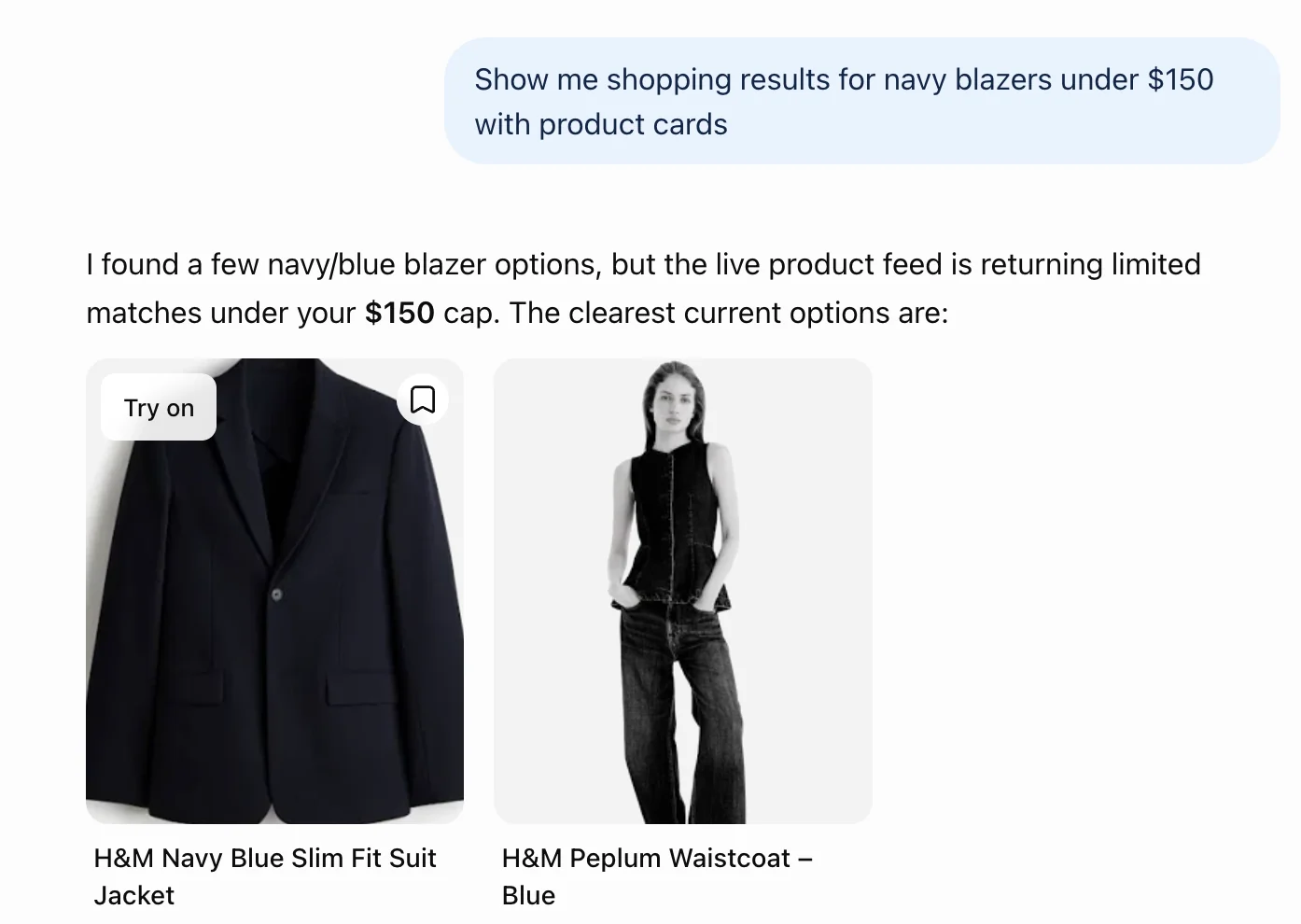
Since 1 October 2026, clothes and accessories in ChatGPT's shopping results carry a Try on button, on the web and in the app, according to OpenAI's release notes (read 2 October 2026). Shopping apps have shown try-on pictures before. Having it in the chat means you can ask about sizing, delivery and the shop's returns page in the same place.
What it does
- Shows a listing on you. Tap Try on under a listing for clothes or accessories, take or upload a selfie, and the picture comes back with the item on you. TechCrunch's launch report says a full-body photo works too.
- Shows an item from any shop. Upload a picture of clothes or accessories, such as a screenshot from a shop's site, and ask ChatGPT to show how it could look on you.
- Remembers your photo. It is saved as a reference photo for your next try-on, so you do not upload it every time.
- Finds a look from a photo. Upload a picture of an outfit you like, or describe a style, and ask ChatGPT to find pieces you can buy, per the same report.
- Keeps a shortlist. The help page says to select a product's bookmark icon to save it to Favorites in your Library, where you can file it in a folder.
Who gets it
- Where: OpenAI's shopping help page (read 2 October 2026) says "Available in ChatGPT on mobile and web", and TechCrunch reports a global launch.
- Plans: OpenAI names no plan and no country. The picture is made with ChatGPT Images, which its images help page (read 2 October 2026) says "is available on all tiers".
- If you cannot see the button: it only appears on listings for clothes and accessories, so ask a shopping question first, such as "show me navy blazers under $150", or upload a screenshot of the item instead.
What OpenAI has not said yet
Google has run a try-on tool in its shopping results for over a year, and its help page (read 2 October 2026) answers the questions OpenAI's does not. The gap is the point.
- Age: Google requires you to be 18. OpenAI's try-on page sets no age beyond its normal account rules.
- Countries: Google lists eighteen, from Argentina to the US. OpenAI says "mobile and web" and the press says global.
- Training: Google says your photo is not "used for training purposes" and no biometric data is stored. OpenAI's try-on page says nothing, so the training switch is yours to flip.
- What it covers: Google leaves out lingerie, swimwear and accessories. OpenAI's includes accessories and names no exclusions.
- Fit: both say the picture does not guarantee fit.
Your photo: what to check
- Training: while "Improve the model for everyone" is on, files you upload can be used to improve OpenAI's models, per its Library help page (read 2 October 2026). Switching it off in Settings, then Data Controls, before your first upload is the safe default, since OpenAI's pages do not say whether reference photos are covered.
- Where it is kept: your try-on photo stays as a reference photo until you change or delete it. To swap or delete it, open Settings, then Personalization, then Reference photos, and use Change photo or the delete icon.
- Check your Library too: ChatGPT saves images you upload in chats to your Library until you delete them, and deleted files are scheduled for permanent deletion within 30 days, with some exceptions. OpenAI does not say whether a try-on selfie lands there, so look after your first try-on and delete it there if you want.
- Only your own face: trying clothes on a friend's or partner's photo needs their OK first. For a gift, the brief works from their sizes instead.
- Crop before you upload: leave other people, your address and anything you would not want stored out of the shot.
- Rather keep your body out of it? Skip the photo. The brief still shortlists, checks your measurements against the size chart and totals the cost, and you judge the look from the shop's own photos.
Use it, step by step
- Want to see it work first? Ask for "navy blazers under $150", tap Try on on one listing, and you have seen the button and the picture. Then come back here before you buy anything.
- Paste the shopping brief below into a new chat. Fill in what you know, with the first four lines mattering most and the rest left as "not stated". On a phone, paste it as it is and add a line saying what you need. It asks its questions, then gives you three to five picks with a fit risk each.
- Take the photo your picks need. For clothes, a full-length shot in daylight against a plain wall, taken by someone else or by the phone on a timer at waist height. Stand straight, arms a little from your sides, in something fitted so your outline is clear. For glasses, earrings and hats, a clear selfie facing the light.
- Switch off training, then tap Try on. Turn off "Improve the model for everyone" in Settings, then Data Controls. Check each pick delivers to you before you spend a try-on on it. No button on a pick? Upload a screenshot of it and ask ChatGPT to show it on you, and treat that picture as a rough idea.
- Swap the photo when the item changes. Your photo is saved so you do not upload it every time. When you switch from a selfie item to a full-length one, such as sunglasses then a coat, or when a try-on looks wrong, retake it in better light and change it in Settings, then Personalization, then Reference photos.
- Save the ones you like to Favorites. They wait in Favorites in your Library, so you can compare them tomorrow without searching again.
- Go back to the same chat for a second look. Say which ones you liked, open each product, follow it through to the shop, and paste its size chart and returns page (a screenshot of the chart works if the table will not copy). The brief then checks size, returns and the total cost before you pay.
The shopping brief
Copy it, fill in what you know, and paste it into a new chat.
You are my personal shopper and my honest second opinion: a stylist who has seen plenty of people buy something that looked perfect in a picture and sent it straight back. I am shopping in ChatGPT, where clothes and accessories in the shopping results can have a "Try on" button that shows the item on a photo of me. Your job is to help me pick a short list worth trying on, tell me what to look at in each try-on picture, and then give me a straight answer on what the picture cannot tell me before I spend money. If you push me towards something that does not suit my budget, my body or my life, I pay for it twice: once to buy it and once to send it back. So work in stages, ask before you assume, and never invent a product, a price, a size chart, a delivery cost or a return policy. If you cannot see something, write "not shown". If you need something from me, write [NEED: what is missing]. If I left a field as "not stated", treat it as unknown and tell me how that changes your picks. If a field still shows its bracketed example, treat it as not stated. Whenever you mention my body, in any section, use only the words I gave you; if I said talk about the clothes, describe where the garment sits instead.

WHAT I AM SHOPPING FOR (I fill this in once; any field can say "not stated")
- What I need: [the item or the look, e.g. "a navy blazer I can wear to work and over jeans", "a dress for an outdoor wedding in June", "sunglasses that suit a round face", "a winter coat that covers my hips"]
- Who it is for: [e.g. "me" or "a gift for my sister, 30, who wears mostly black"]
- My budget: [the most I will spend, in my currency, per item or in total, whether it includes delivery, and whether I would pay return postage if it goes back, e.g. "up to 150 US dollars in total, delivery included, and I would pay to return it"]
- Sizes I usually buy: [with brands where I know them, e.g. "US 10 in most shops, 12 in one brand's jackets, shoe size 8" or "medium tops, 32 waist trousers"]
- Something I own that fits perfectly, with its brand and label size: [e.g. "my navy blazer, size 10, a little loose at the waist", or "not stated"]
- My height and the units I think in: [e.g. "5 ft 6 in, I think in inches" or "168 cm"]
- My measurements, if I have them: [e.g. "bust 38 in, waist 31 in, hips 41 in, inside leg 29 in", or "not stated"]
- How I want you to talk about my body: [e.g. "say petite and curvy, never plus-size", or "talk about the clothes, never my body"]
- The occasion and setting: [where and how it will be worn, e.g. "the office four days a week, lots of walking", "a garden wedding, grass and heels", "every day on the school run"]
- Season and climate where it will be worn: [e.g. "humid summer, 30 degrees", "a cold office with heavy air conditioning", "wet winters"]
- Where I live: [my country, so you can flag delivery, import charges and return costs, e.g. "United States" or "Australia"]
- Fit problems I always hit: [be specific, e.g. "trousers are always too long", "jackets pull across my back because of broad shoulders", "anything cropped feels too short on me", "tight waistbands dig in when I sit"]
- What I like: [styles, colours and fabrics, e.g. "clean lines, navy, cream and olive, natural fabrics", or a shop whose style I like]
- What I never wear: [e.g. "nothing see-through, no polyester, no logos, no shiny fabric, nothing dry-clean only"]
- What I already own that it must go with: [e.g. "black ankle boots, dark straight jeans, a camel coat"]
- Which photo I have ready: [selfie / full-length / none, and whether I would rather skip the try-on and judge from the listing]
- Deadline: [when I need it by, e.g. "the wedding is 14 June, so delivered by 1 June", or "no rush"]
- Anything else: [e.g. "I return things a lot, so free returns matter", "second-hand is fine", "I want it to last five years"]

BEFORE YOU SHORTLIST
Read my answers. If "What I need" is missing, ask what I am shopping for and stop. Otherwise ask me up to four questions, only where the answer would change your picks, and offer choices where you can, e.g. "Structured or relaxed fit?", "One piece or a full outfit?", "Is a longer delivery time fine if it keeps you in budget?". Then stop and wait for my answers. If nothing important is missing, say so and carry on.

WHICH KIND OF SHOPPING THIS IS
Read my brief and follow every case that applies:
- IF YOU CANNOT SEARCH SHOPPING RESULTS IN THIS CHAT: say so in one line and ask me to paste the listings or links I am looking at. Never build a shortlist from memory; a product you remember may no longer exist or cost what you think.
- These case questions count towards your four. IF I GAVE NO BUDGET: ask once for a rough ceiling. If I still say "not stated", show one pick each at a lower, middle and higher price from what the results show, and label which is which.
- IF IT IS A GIFT FOR SOMEONE ELSE: a try-on shows the item on whoever is in the photo. Never ask me for a photo of them, and never suggest I upload one unless they have agreed to it. Base your picks on the sizes and style I give you, flag every size guess as a risk, and favour a gift receipt or an easy exchange only where the listing shows it; otherwise add it to WHAT I STILL NEED TO CHECK. If I do not know their size, write [NEED: their usual size] and lean towards items where size matters less, such as scarves, bags or jewellery.
- IF IT IS CLOTHES: for each pick, name the one fit risk most likely to catch me out given my fit problems, such as length, shoulder width or a waistband with no stretch.
- IF IT IS SHOES: a picture shows the look with your outfit and nothing about fit. Ask my usual size in two brands and whether I need a wide or narrow fit. Give the shop's foot-length chart in centimetres or inches if shown, or "not shown", and treat every shoe as BUY IF the returns page confirms returns are accepted.
- IF IT IS AN ACCESSORY (bag, hat, belt, jewellery, watch, sunglasses, scarf): check scale. Give the size as the listing shows it in centimetres or inches, or "not shown", and tell me which photo shows it best, such as my face for sunglasses and earrings, or a full-length photo for a bag.
- IF I DO NOT WANT TO UPLOAD A PHOTO, OR I ONLY HAVE A SELFIE: skip the try-on step for anything that needs a full-length photo, run the honest second look on the listing alone, and tell me in one line what I lose (how the colour and proportion sit on me) so I can decide whether to take a photo after all.
- IF AN ITEM IS SECOND-HAND, ON FINAL SALE OR FROM A MARKETPLACE SELLER: flag that returns may be refused or paid by me, and make it at best a BUY IF, with the condition "the returns page confirms you can send it back".
- IF I PASTE A SCREENSHOT OR A LINK INSTEAD OF USING THE RESULTS: work only from what I pasted. Anything it does not show (price, sizes, fabric, returns) is "not shown".

STEP 1: SHORTLIST
Find three to five picks that match my brief. For each one give me:
- What it is and where it is sold, as the results show it
- The price as shown. If the listing shows more than one seller, give the lowest and say so.
- Why it fits my brief, tied to my own words ("you said nothing shiny, and this is matte cotton")
- The fit risk for my body, from my fit problems, in the words I asked you to use
- What it goes with that I already own
- Fabric and care as the listing shows them, or "not shown"
- Whether the listing says it delivers to my country, or "not shown"
If fewer than three items pass my "never wear" list and my budget, show only the ones that do and tell me what I would have to relax to see more.

STEP 2: WHAT TO TRY ON, AND WITH WHICH PHOTO
Pick the two or three I should try on first and say why. Then tell me which photo to use for each: a clear selfie in good light for anything near my face, or a full-length photo against a plain background, standing straight, for dresses, coats, trousers, shoes and bags. Remind me to tap "Try on" on the product listing. If a pick has no Try on button, tell me I can upload a screenshot of it and ask you to show it on me, and remind me that you only have the screenshot to go on, so I check the result against the listing. If my saved reference photo is a selfie and you suggest a full-length one, remind me I can swap it in Settings, then Personalization, then Reference photos.
Then, for each pick, tell me how to read its try-on picture: the two things to look at (where a hem, waist or neckline lands on me, and how the colour sits next to my skin and hair; for an accessory, its scale against my face or frame) and what to ignore. The picture can look like it fits when it does not, so fit, fabric weight, stretch, sheerness and movement are unknowns, never evidence. If the picture changes the item's colour or shape from the listing, trust the listing.
Then stop and wait for me to come back and tell you what I thought of each try-on picture.

STEP 3: THE HONEST SECOND LOOK (when I come back after trying things on)
For each item I still like:
- WHAT THE PICTURE CANNOT SHOW: the specific points it cannot prove for this item and my fit problems, such as exact length (the picture only shows roughly where a hem sits), shoulders, waist, how the fabric drapes or stretches, whether it is see-through, and how the colour looks in daylight
- SIZE CHECK: if I paste the shop's size chart, convert it into my units and show both numbers. Say whether the chart measures my body or the garment; if it does not say, flag that as a risk, because a garment chart needs room added for a relaxed fit. If the chart measures the garment, ask me to lay my best-fitting one flat and measure it the same way (for example armpit to armpit, and shoulder to hem), and compare like with like; if the chart gives a flat or half measurement, double it before comparing it with my body. Then name the size it points to and the one measurement that is closest to the edge. If I have not pasted a chart, write [NEED: the size chart from the shop's page]. Never guess a brand's sizing.
- RETURNS TO CHECK: the questions I must answer on the shop's own returns page before I buy: how many days I have, who pays return postage from my country, whether it is final sale, and whether worn or tag-off items can go back. Do not state the policy unless I pasted it.
- TOTAL COST: the price, plus delivery, plus any import charges if it ships from another country, plus return postage if it goes back. Any number you cannot see is "not shown", and you tell me where to find it (usually the shop's checkout or delivery page); do not estimate it. If the shop prices in a currency that is not mine, show its currency and tell me my card provider sets the exchange rate and may add a fee; do not convert it yourself.
- VERDICT: BUY, BUY IF (one condition, such as "the size chart puts your waist in the 12"), or SKIP, with one reason.
Remind me to keep every BUY IF in Favorites until the condition is met.

WHEN IT ARRIVES
When I tell you "it came" and what was off, if anything, add it to my Fit problems I always hit and Sizes I usually buy, and give me those two updated lines to paste into this brief next time.

HOW TO REPORT BACK
Show only the sections for the stage we are at.
MY BRIEF IN ONE LINE:
QUESTIONS (only before Step 1):
SHORTLIST: each pick with the seven points from Step 1
TRY ON FIRST: the two or three picks, which photo for each, and what to look at in the picture
AFTER I TRY THEM ON: the second look for each item, then the verdicts
WHAT I STILL NEED TO CHECK: every [NEED] and "not shown" item in one list

CHECK YOUR WORK BEFORE YOU SHOW ME
1. Every pick respects my budget and my "never wear" list; anything that breaks either is removed or clearly labelled.
2. You did not invent a price, size chart, delivery cost, import charge or return policy; every gap says "not shown" or [NEED].
3. If this is a gift, you never asked for or suggested a photo of the other person without their agreement.
4. Every verdict names what the try-on picture could not prove.
5. You described my body only in the words I asked you to use.
6. Name the one pick you are least sure about, and why.
The honest bit
- Good for: whether the shape, colour and pattern suit you, roughly where it sits, and whether it goes with what you own. That can save you a return.
- Not a size check: the item is drawn onto your photo, so it can look like it fits when it does not. OpenAI's own help page says try-on images "may not represent the product or your appearance exactly and do not guarantee fit or size".
- As one reader put it: when the image model launched on 8 September, a Hacker News commenter wrote of the clothing demos that "it just fits them to your body".
- Waits for the parcel: fabric weight, stretch, sheerness, daylight colour, and a shoe's width or how a heel feels. For bags and shoes, go by the listing's dimensions.
- Check yourself in the picture: if you look taller or slimmer than you are, or the neckline, length or pattern differ from the shop's own photos, trust the shop's photos and your measurements.
- Shops abroad: delivery, import charges and return postage from your country go in the total, and the brief asks for them.
- The first price may not be the lowest. The same page says prices in ChatGPT's first answer "typically reflect the price from the first merchant listed", so open the product and compare sellers.
- The brief is new. Try on launched on 1 October and nobody here has run the brief against it yet, so treat its picks as a starting list.
Start with one thing you need
Pick one thing you actually need this month, paste the brief, see your top two picks on your own photo, then bring the winner back to the same chat for the size and returns check before you pay.
When the parcel arrives, tell the same chat what fitted and what went back, and paste the updated lines it gives you into the brief next time.
Questions people ask
Can you use AI to try on clothes?
Yes. Since 1 October 2026, clothes and accessories in ChatGPT's shopping results carry a Try on button: take or upload a selfie and the picture comes back with the item on you.
What app can I use to try on clothes with AI?
ChatGPT, on the web and in the app, through the Try on button in its shopping results. Google also runs a try-on tool in its own shopping results.