
I built my own version of Wispr Flow, and it costs me $0 a month.
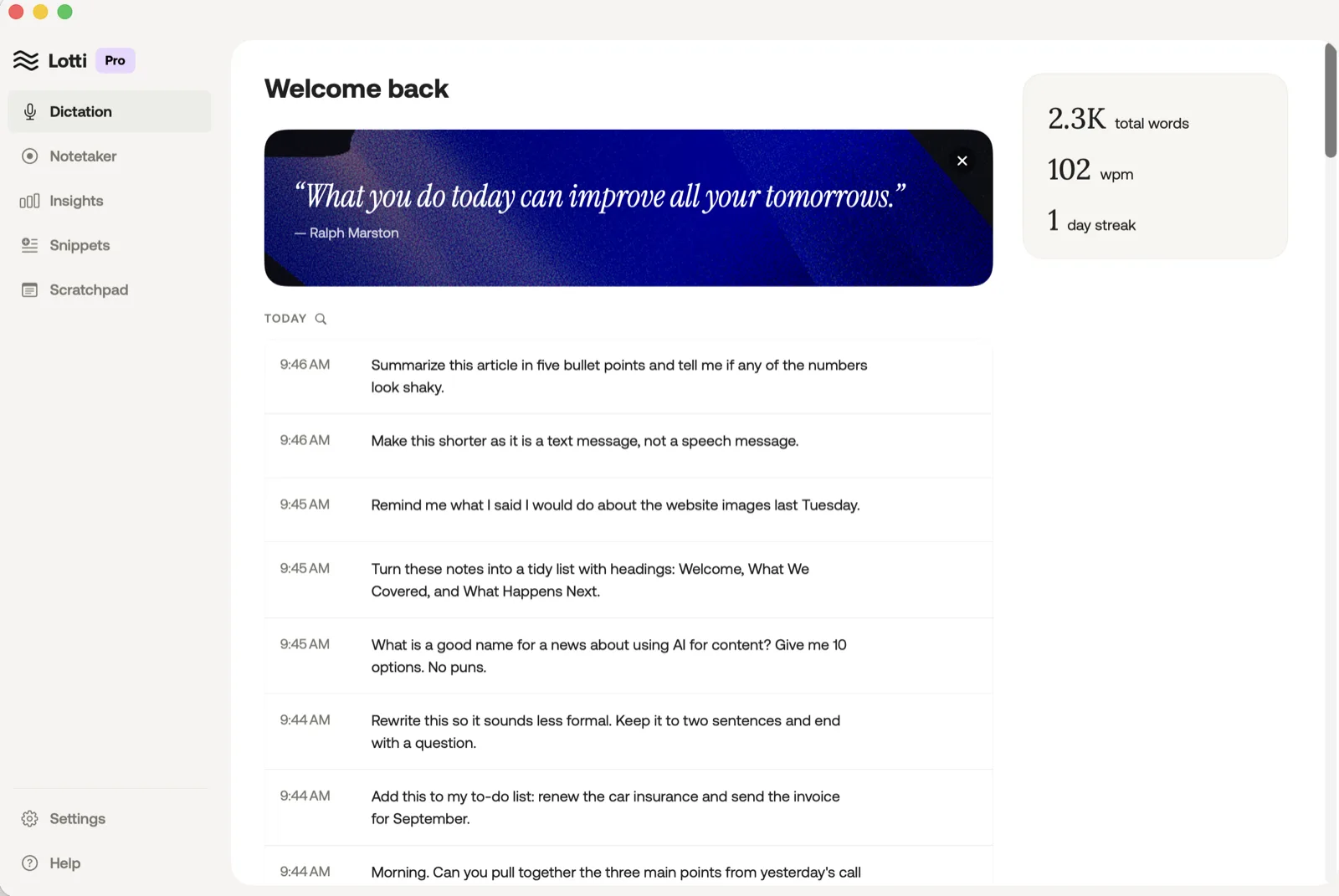
Hold a key on your keyboard, say what you need to say, let go, and the words land in whatever app or chat you were using. That is what I wanted, and it is what Lotti does.
What Lotti does
- Hold to talk. Hold the hotkey, a small pill appears with a live waveform and a pop sound, speak, release, and the tidied text pastes into the app in front.
- Hands-free lock. Trigger key plus the space bar keeps it listening until you press the key again.
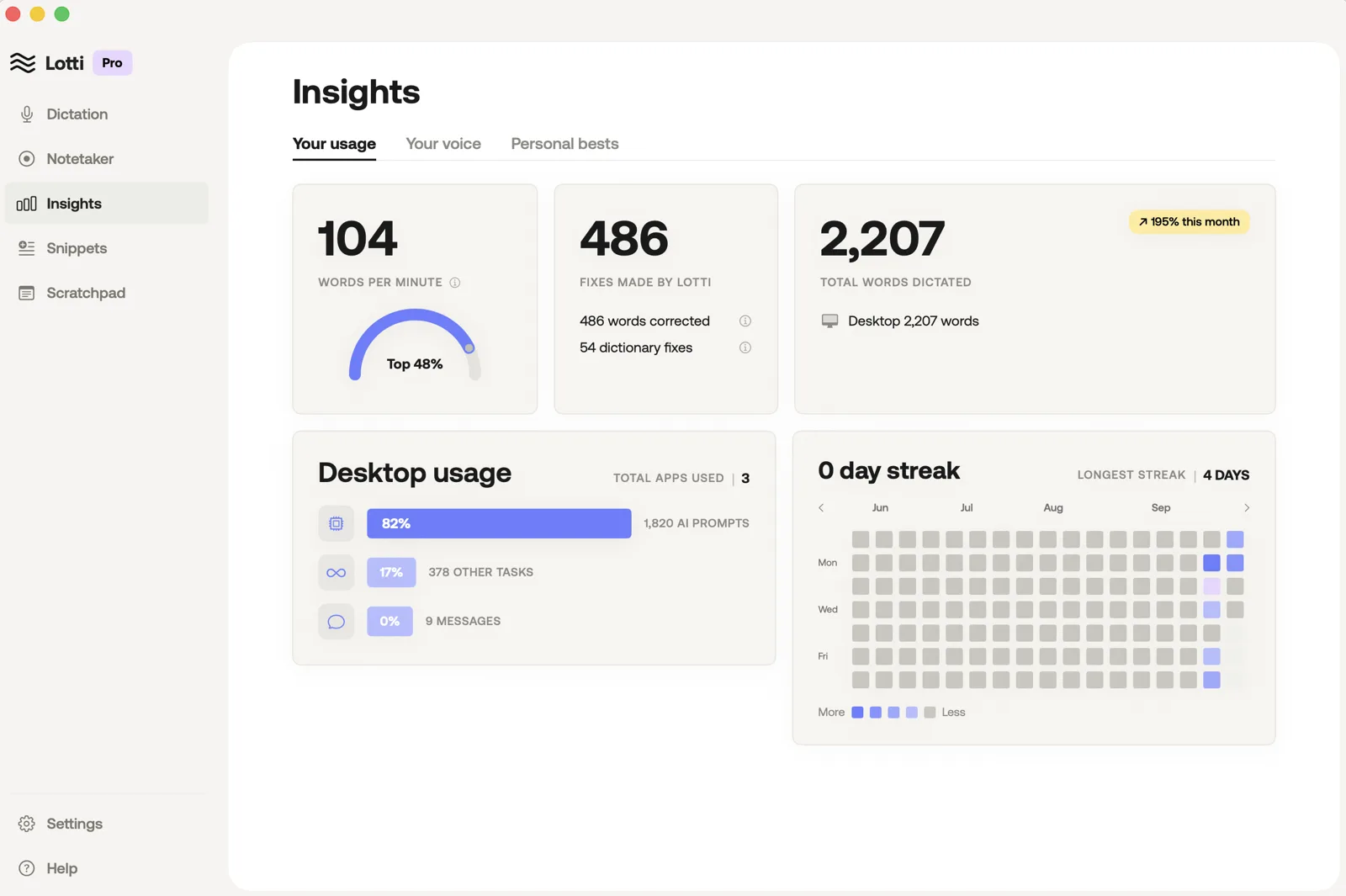
- History and insights. Every dictation is saved on the Mac, with words per minute, a streak, total words and which apps you dictate into.
- The rest is pencilled in. Snippets, a scratchpad and a notetaker sit in the sidebar so they can be built next.
What you need
- A Mac with an Apple chip and a recent macOS, plus Xcode, Apple’s free app for building apps, from the App Store. It is a big download, so start it first and open it once. On Windows you need its own equivalent, which I have not tried.
- Claude Code, Anthropic’s coding tool, set up in the Claude desktop app or in Terminal. It needs a paid Claude plan, or pay-as-you-go API credit.
- A Deepgram account, which is free, needs no card and comes with $200 of credit.
- A few sittings. Your side is saying yes to permissions, pasting the key and testing each piece. Claude Code does the rest.
How I built it, step by step
- Write a brief of what you want it to do. Mine: hold one key, speak my thoughts, and have them pasted into whichever chat I am in, a social app, Claude or ChatGPT, plus somewhere to brainstorm notes. For features the paid app has, use its names, such as Snippets and Scratchpad, so Claude Code knows what you mean.
- Compare the engines that turn speech into text. This is the one piece you pay for. I compared the main ones and Deepgram came out closest to Wispr Flow, with the biggest free credit.
- Sign up at Deepgram and get your key. At Deepgram’s console, make an API key, a long password the app uses to talk to Deepgram. Keep it in your password manager until Claude Code builds the settings screen, then paste it there. The app keeps it in the Mac’s Keychain, its built-in password store.
- Mock up the screen, or take inspiration from apps you like. Mine has a sidebar, a home screen with a feed, and an insights page with cards and a streak grid. Screenshots or sketches of what you want are part of the brief.
- Hand Claude Code the brief and make it write a spec first. I used plan mode: Claude Code wrote a one-page design spec, we agreed it, and only then did it build, one piece at a time. The brief below asks for that.
- Grant the two Mac permissions. Microphone, which the Mac asks for once. Accessibility, so it can catch the hotkey and type into other apps, which you switch on yourself under Privacy & Security. This took me a little troubleshooting. Quit any other dictation app while you test, so the two do not fight over the key.
Prices and feature names here are from each company’s own pages, read on 1 October 2026.
The engines I compared
Deepgram, the one I picked
- Free credit: $200 on sign-up, no card, no expiry. Its pricing page says that is about 700 hours of transcription.
- Price after that: under a cent a minute for streaming on its main model, on a rate the page marks as promotional, so check it on the day.
- Watch for: if you ever add a card, auto-reload is on by default and tops up $100 when you drop under $10. Turn it off in account settings first.
- Verdict: the biggest credit, one key, words come back while you speak, and billing by the second.
The others
- AssemblyAI: $50 free credit, no card. Streaming bills on connection time, so idle seconds count.
- OpenAI: no sign-up credit on its pricing page; its transcription models run from a fraction of a cent to a couple of cents a minute.
- Google: the first 60 minutes a month free, then paid, and it needs a Google Cloud project with billing set up.
- On the Mac itself: free, and nothing leaves your computer, using Apple’s built-in speech recognition or an open model. Accuracy and speed depend on your machine.
The brief: build me a dictation app
Make an empty folder and save your screenshots into it with plain names, such as mockup-home.png. Open Claude Code in that folder: in the Claude desktop app, pick the folder when you start a session; in Terminal, type cd, drag the folder in, press return, then type claude.
Fill in the lines under ABOUT THIS BUILD, paste the brief, and answer its questions before it writes the spec.
You are a senior Mac developer who has shipped small native apps, and you are building me a personal voice-to-text app that replaces a paid dictation subscription. I am not a developer. I will test, approve permissions and tell you what feels wrong; you write every line of code. The stakes: this app will type into every window on my Mac and send my voice to a third party, so a sloppy build costs me my clipboard, my privacy or my patience. Work in stages and never jump straight to code.

ABOUT THIS BUILD (I fill this in once; any line can say "not stated")
- App name: [e.g. "Lotti"]
- Trigger key: [the key I hold to talk, e.g. "right Command" or "Fn"; or "you suggest one that no other app uses"]
- Language: [e.g. "English only" or "English and Portuguese", which changes the Deepgram model variant]
- Clean-up step: [on or off; if on, which model and provider I want to use for tidying the text, e.g. "a small, cheap model from my Anthropic account", or "not stated"]
- What I want in version one: [e.g. "hold-to-talk, hands-free lock, a history of what I said, and an insights screen with words per minute, streak and total words"]
- What can wait: [e.g. "snippets, a scratchpad, a dictionary, a notetaker"; keep them in the sidebar as placeholders]
- The look: [describe the window and the floating pill, or say "the screenshots are in this folder: [file names]"]
- Apps I dictate into most: [e.g. "Claude, Slack, Gmail in Chrome"]
- Speed I expect: [e.g. "under a second from key release to text on screen", or "not stated"]
- My Mac: [chip and macOS version, from the Apple menu, then About This Mac, e.g. "Apple Silicon, macOS 26"]
- Keys I have: [e.g. "a Deepgram API key" and, if the clean-up step is on, "an Anthropic API key"]

Never put a key in the code, a file in the project, or a chat message. Keys go in the macOS Keychain and I paste them into the app's settings screen.

STAGE 1: CLARIFY, THEN WRITE A ONE-PAGE SPEC
Read my answers. Ask me up to five questions whose answers change the build, with options, e.g. "Paste with Command-V, or type character by character?", "Should the pill sit at the bottom centre or follow the mouse?", "Keep history forever, or thirty days?" Then write a one-page design spec in plain words: goals, what is out of scope, the pieces of the app and what each one does, the flow of one dictation from key down to text pasted, the screens, the speed target, and the costs. Show me the spec and wait for my yes before any code.

STAGE 2: BUILD, IN THIS ORDER
Native Swift and SwiftUI, built in Xcode. You build it and launch it yourself from the command line and tell me when the app is open. IF I ever have to open Xcode, name the exact file to open and the button to press. Each piece behind its own clear boundary so it can be tested and swapped on its own:
0. Before anything else: on first run, ask for Microphone and Accessibility, show whether each is granted, and open the right System Settings pane. Also give me a settings field to paste my Deepgram key into the Keychain, so the engine can be tested as soon as it exists.
1. Hotkey manager: watches for my trigger key anywhere on the Mac; emits start, stop, lock and cancel. Hands-free lock is trigger key plus spacebar; pressing the trigger key again stops.
2. Audio capture: the microphone as 16 kHz mono audio, streamed to the engine as I speak, and a live waveform for the pill.
3. Transcription engine, behind a protocol so it can be swapped later: Deepgram streaming over a WebSocket, model nova-3 (the multilingual variant if I named more than one language), interim results on, and mip_opt_out=true on every request so Deepgram keeps no audio or transcript after it answers. IF a Deepgram parameter is unsure, read developers.deepgram.com and quote the page; never guess.
4. Clean-up step, if I turned it on: raw transcript in, tidied text out, with a switch in Settings and a count of what changed. IF off, skip it.
5. Text injector: saves whatever is on my clipboard, pastes the final text into the frontmost app, restores my clipboard, and records which app it pasted into.
6. Floating pill: a small always-on-top panel that never steals focus, with the waveform, a cancel control, a confirm control for hands-free mode, and a sound on start and on end.
7. Store and insights: every dictation saved on my Mac (text, app, time, duration, word count), and screens for history and for words per minute, streak, total words and per-app use.
8. Settings: trigger key, engine, clean-up on or off, API keys (Keychain), and a permissions panel that shows what is granted and opens the right System Settings pane for Microphone and Accessibility.

Apply these whatever I wrote above:
- IF a feature needs a permission I have not granted, say so in the app and stop, never fail silently.
- IF the text would be pasted into a password field, do not paste; show it in the pill instead.
- IF the engine drops the connection mid-sentence, keep what it has, tell me, and offer to retry.
- IF the clean-up step is on, tidy the text before it is pasted; never rewrite text that has already landed in the other app.
- IF an app refuses the paste, fall back to typing it character by character and say which apps needed it.
- IF the Accessibility grant drops after a rebuild, tell me why and whether a stable signing setup prevents it, from Apple's docs; never guess.
- Build small and show me after each piece runs, with one line on how to test it. Never build everything and hand it over at the end.

STAGE 3: TEST BEFORE YOU SAY IT WORKS (I do the speaking; you tell me the exact keys and clicks, then check the result)
1. Have me dictate one sentence into TextEdit, a browser text box, Terminal and the apps I named, and confirm from the history store what landed in each.
2. Have me copy something, dictate, then confirm the clipboard still holds what I copied.
3. Have the app log the time from key release to text pasted, have me dictate five times, and report the numbers against the target in the spec. IF it misses, say what you tried and what you recommend.
4. Have me lock hands-free, speak two sentences and stop, then confirm both landed.
5. Quit and relaunch, and confirm the history and the keys survive.

HOW TO REPORT BACK, EVERY TIME YOU HAND ME SOMETHING
WHAT WORKS NOW: one line each
WHAT I SHOULD TEST: the exact clicks or keys
WHAT I STILL NEED TO DO: permissions, keys, anything only I can do
WHAT YOU WERE UNSURE OF: and where you checked
WHAT IT COSTS TO RUN: per minute of speech, from the provider's own pricing page, with the date you read it

CHECK YOUR WORK BEFORE YOU SHOW ME
1. No key, token or password appears in any file or message.
2. Every Deepgram parameter you used is on their docs, and mip_opt_out=true is on every request.
3. The clipboard is restored after every paste.
4. Everything the app needs permission for is listed in the permissions panel, with its System Settings path.
5. You named the one piece you are least sure of, and why.
What it costs to run
- Transcription: nothing so far. Every minute comes off the Deepgram credit.
- Clean-up: Lotti passes the raw text through Claude’s cheapest model to fix mistakes and drop filler words. That runs on an API key from Anthropic, billed per use and separate from a Claude plan. My spec allowed a few dollars a month for it at heavy use; so far my bill is $0.
- Everything else: runs on the Mac, free.
The honest bit
- It is a beat slower than the paid app. The spec aimed for under a second from key release to text, and Lotti lands at about one and a half. The faster trick, pasting words as they arrive and tidying them afterwards, kept mangling the text, so Lotti waits for the tidy version.
- The Accessibility grant goes stale. After a reinstall, the Mac forgets the app was trusted and the permission has to be granted again. It is the one recurring annoyance.
- Your voice leaves the Mac. Deepgram keeps audio to improve its models by default; the brief sets the switch that stops that, per Deepgram’s data page. Do not dictate passwords.
- Good, and a step behind the best. On 17 September Wispr Flow published its own speech model and says it beats Deepgram on accuracy in its test.
- You are not the first. One developer’s Mac prototype on the same engine (6 September 2026) does much the same and ships an honest list of its limits. Build yours for you, and to learn how the pieces fit.
Start with your list
Write down what you actually use a dictation app for, sign up for the credit, and hand Claude Code the brief tonight.
A few quick questions
Do I need to know how to code?
No. Claude Code writes the Swift, Apple’s programming language, and your jobs are the ones it cannot do: install Xcode and open it once, paste your key into the app, approve the permissions and test each piece. You do need Claude Code, which needs a paid Claude plan or API credit.
Will it run on Windows?
Not from this brief, which is written for a Mac. Windows needs its own equivalent of Xcode and a different hotkey and typing method, and I have not tried it. Say you are on Windows in the first line and let Claude Code plan for it.