
That teaching comes back with you, so Claude starts already knowing your job, your style and your regulars instead of guessing. Nothing gets copied out by hand.
The whole move rides on one prompt, and Claude is the one that wrote it, so you can read exactly what you are handing over before you send it. It is printed in full below.
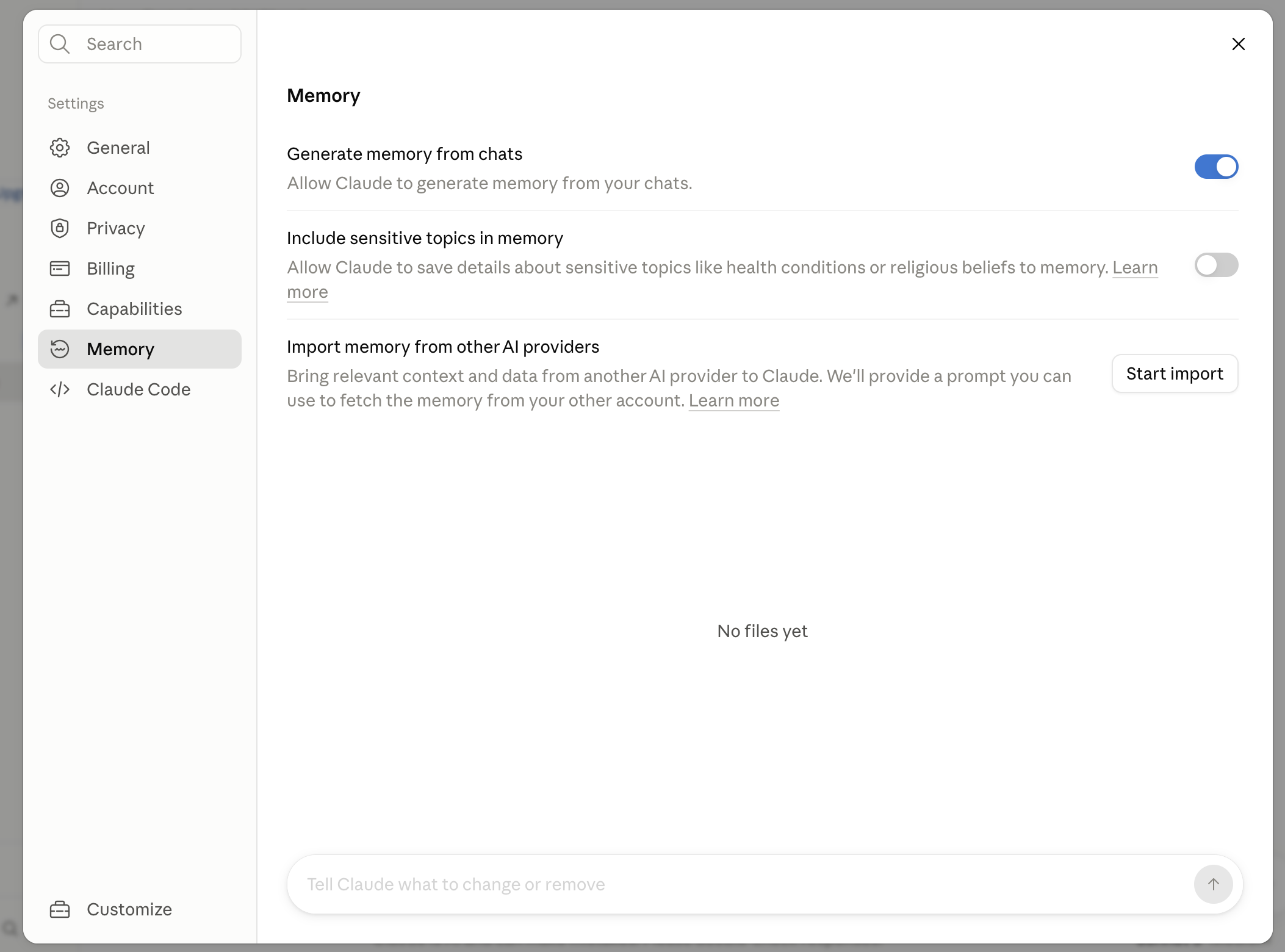
To import your ChatGPT memory into Claude, open Claude's Memory settings and start an import from another provider. Claude gives you a prompt. Paste that prompt into ChatGPT, copy the memory export it produces, then paste that back into Claude.
How to carry it across
- Start the import in Claude. Open Claude's Settings, then Memory, then Import memory from other AI providers, and press Start import. Claude hands you a prompt to run in ChatGPT. It is the same prompt shown below, so you know exactly what you are asking for.
- Copy the prompt. Grab the prompt from the copy block below. It is written to make ChatGPT list everything it has saved about you in clean, dated categories, wrapped in one code block you can copy in a single tap.
- Paste it into ChatGPT and send. Open ChatGPT, paste the prompt, and send it. ChatGPT writes out your instructions, identity, career, projects and preferences as one tidy block, and tells you if there is more to pull.
- Paste ChatGPT's output back into Claude. Copy the whole block ChatGPT produced and paste it back into the Claude import, or into a chat where you say "remember this about me". Claude now starts every chat knowing what ChatGPT knew.
- Read it before you paste, and cut the sensitive bits. The export can hold things you have forgotten you said. Skim it and drop anything private or no longer true, so you carry across the useful context and nothing else.
The prompt Claude gives you
This is the exact prompt. Copy it, paste it into ChatGPT, and it returns everything ChatGPT knows about you in one code block, ready to paste back into Claude.
Export all of my stored memories and any context you've learned about me from past conversations. Preserve my words verbatim where possible, especially for instructions and preferences.

## Categories (output in this order):

1. **Instructions**: Rules I've explicitly asked you to follow going forward, tone, format, style, "always do X", "never do Y", and corrections to your behaviour. Only include rules from stored memories, not from conversations.

2. **Identity**: Name, age, location, education, family, relationships, languages, and personal interests.

3. **Career**: Current and past roles, companies, and general skill areas.

4. **Projects**: Projects I meaningfully built or committed to. Ideally ONE entry per project. Include what it does, current status, and any key decisions. Use the project name or a short descriptor as the first words of the entry.

5. **Preferences**: Opinions, tastes, and working-style preferences that apply broadly.

## Format:

Use section headers for each category. Within each category, list one entry per line, sorted by oldest date first. Format each line as:

[YYYY-MM-DD] - Entry content here.

If no date is known, use [unknown] instead.

## Output:

- Wrap the entire export in a single code block for easy copying.
- After the code block, state whether this is the complete set or if more remain.
What comes back, an example
Here is the kind of block ChatGPT hands back, for someone who runs a small home-cooking newsletter. It is a made-up example so you can see the shape before you run your own. Yours will be longer or shorter depending on how much ChatGPT saved, and this is the export you read through and trim before it goes into Claude.
## Instructions
[2025-02-14] - Write in [your spelling preference], keep it warm and plain, no jargon.
[2025-04-03] - [Your punctuation rule for the newsletter.]
[2025-06-20] - When I paste a recipe, always give the metric weights first.

## Identity
[2024-11-02] - First name Priya, based in Bristol.
[2025-01-18] - Cooks mostly South Indian and Italian food at home.

## Career
[2024-11-02] - Runs a weekly home-cooking newsletter as a side project.
[2025-03-09] - Day job in primary school teaching.

## Projects
[2024-11-02] - Weekly newsletter "Second Helpings", roughly 400 subscribers, sent Sunday mornings. Status: live. Key decision: one recipe per issue, no ads.
[2025-05-11] - Building a printable recipe card template to give away. Status: in progress.

## Preferences
[2025-02-14] - Prefers short intros, gets to the recipe fast.
[2025-07-01] - Likes suggestions for cheap seasonal swaps.

This is the complete set of stored memories. Nothing more remains.
Read it the way you would read a reference someone wrote about you. Drop anything out of date or too personal to carry across, keep the lines that save you retyping, then paste the rest into Claude.
Where the line is
- The honest bit: it is a copy, not a live sync. You are moving a snapshot across once, not linking the two accounts. That is also why it is safe: you see the whole export before it goes into Claude, and nothing keeps updating behind your back.
- Check the export before it travels. ChatGPT remembers more than you think it does. Read the block it hands you and drop anything private or out of date before you paste it into Claude.
- If ChatGPT hands back almost nothing, its memory was probably off. The export only carries what ChatGPT actually saved. In ChatGPT, open Settings, then Personalization, and check that Memory and "Reference saved memories" are on. If they were off, there was nothing to carry, and the fix is to build your context fresh in Claude instead.
Do it now, in five minutes
Open Claude's Memory settings and start the import, copy the prompt, run it in ChatGPT, then paste the block it returns back into Claude. Start a fresh Claude chat and ask what it knows about you. If it plays your context back, you have moved across without losing a thing.
Want to understand the place you are saving it to first? Read how to make Claude remember you without retyping.
Questions people ask
How do I transfer my ChatGPT memory to Claude?
Open Claude's Settings, then Memory, then Import memory from other AI providers, and press Start import. Claude gives you a prompt to paste into ChatGPT, which exports everything it has saved about you as one code block. Read it, cut anything private or out of date, and paste the rest back into Claude.
How to download ChatGPT memory?
Ask ChatGPT for it with a prompt. The one on this page, which Claude's import gives you, makes ChatGPT list everything it has saved about you in dated categories, in one code block you can copy in a single tap.
What if ChatGPT hands back almost nothing?
The export only carries what ChatGPT actually saved. In ChatGPT, open Settings, then Personalization, and check that Memory and Reference saved memories are on. If they were off, there was nothing to carry, so build your context fresh in Claude instead.
Does this link my ChatGPT and Claude accounts?
No. It is a one-time copy of a snapshot, not a live sync. You see the whole export before it goes into Claude, and nothing keeps updating between the two accounts afterwards.