
A blank chat is a stranger, so it gives you a generic answer and you spend the first messages fixing that.
The trick is to tell it once, in a place it keeps, so you never type it again. There are two such places, and a block below that fits both.
Make Claude remember you by setting your context once, either in Memory so it carries across every chat, or in a Project so every chat in that folder starts already knowing who you are.
The two places Claude keeps what you tell it
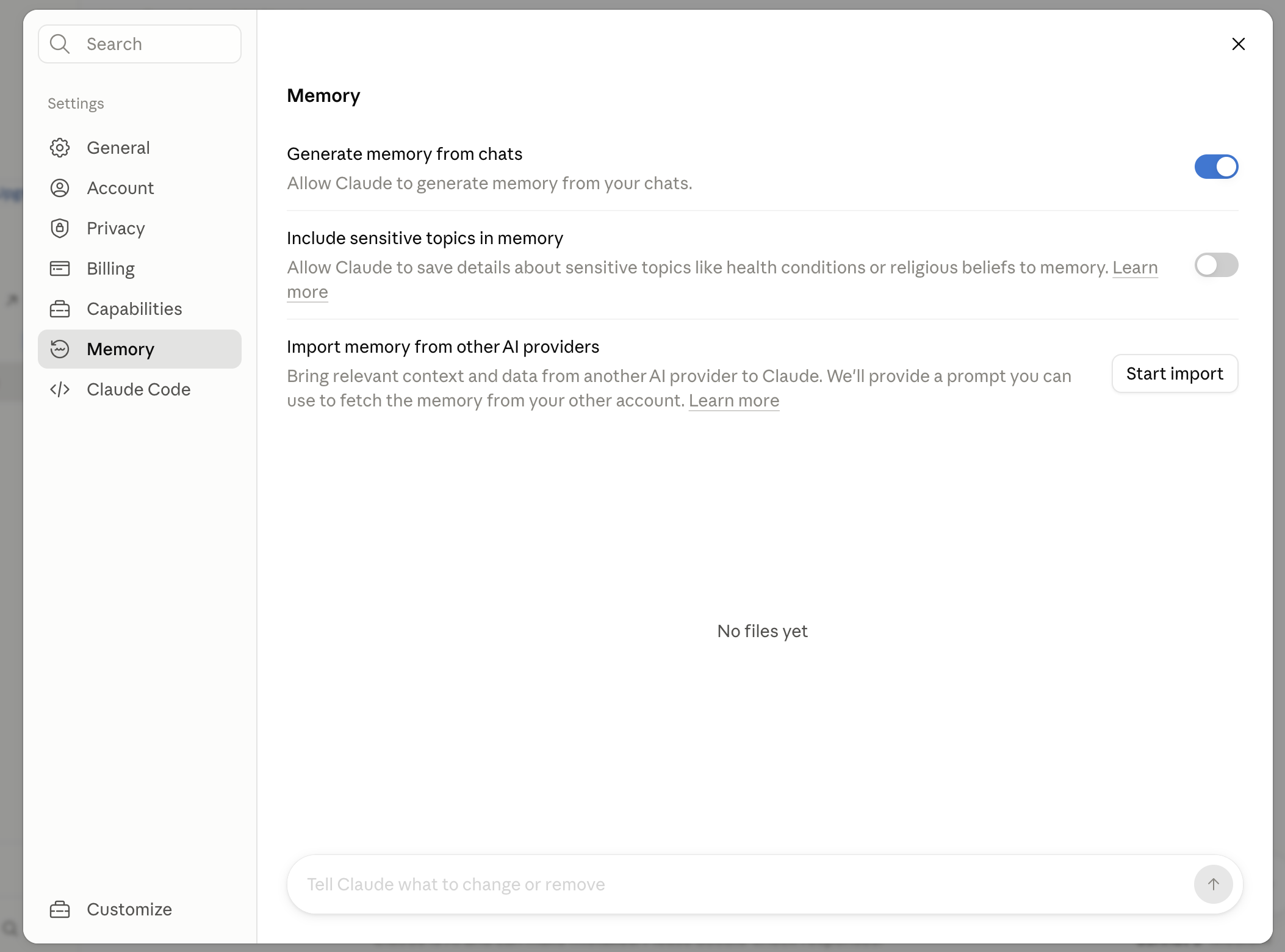
- Memory, for the things that are always true. Open Settings and find Memory. With it on, Claude holds on to useful details about you across chats, so your job, your style and your rules follow you everywhere. Best for the facts that never change no matter what you are working on.
- A Project, for one kind of work. A Project is a folder of chats that share the same instructions and files. Make one, paste your context into its instructions once, and every chat inside it begins already set up. Best when you want a fixed brief for one job, like all your client emails, kept separate from everything else.
- Fill in the block below, not a vague sentence. "I am a small business owner" tells Claude almost nothing. "I run a two-person bakery and write our Instagram captions and supplier emails" tells it what to actually do. The more real the block, the less you correct afterwards, because it is matching your life instead of guessing at it.
- Keep anything sensitive out of it. This is context, not a vault. Leave out passwords, bank details, client names you would not want repeated, anything private. You are setting who you are and how you like replies, not handing over secrets.
- Check it took. After you save it, start a fresh chat and ask "what do you know about me so far". A good reply sounds like "You run a two-person bakery, you write supplier emails and captions, and you want short plain replies with no emoji."
- If the reply is thin, paste it again, then move on. A reply that only says "you are a business owner" means the block did not save. Once it plays your context back, it is working, and there is no need to babysit it after that.
Your profile block
Fill in the brackets once. Paste it into a Project's instructions, or drop it into a chat and say "remember this about me" so Memory keeps it. The brackets are the whole point, so do not skip them.
You are keeping a standing memory of who I am, so I never have to explain myself twice. Read every section below once, save it, and treat it as true for everything you write for me from now on.

WHO I AM
- What I do, in real terms not a job title: [the actual shape of your days, e.g. "I run a two-person bakery in Bristol and do all the admin, the supplier emails and the Instagram myself, usually late once the shop is shut."]
- How long I have been at it: [e.g. "Three years, so I know the trade but I am still new to the wholesale side."]
- Where I am based and the English I write in: [e.g. "Bristol, UK. UK spelling always, never American."]
- The one thing that changes how you should talk to me: [the fact that reframes everything, e.g. "I am always short on time and reading on my phone, so give me things I can send without a second draft."]

HOW I SOUND
- My voice, with a real example not an adjective: [e.g. "Warm but brief, first name only, I sign off 'thanks, Adele'. Copy how I actually write, not a polished version of it."]
- The length I want back by default: [e.g. "Short and ready to use. If a line would do, do not give me a paragraph."]
- How I want the answer laid out: [e.g. "Answer first, reasoning only if I ask. No warm-up line, no summary tacked on the end."]

THE WORK I BRING YOU
- The handful of jobs I will actually ask for, named plainly: [e.g. "Replies to customers and suppliers, Instagram captions, planning the week's bakes, and working out what the odd official letter is really asking for."]
- What "done" looks like for me: [e.g. "A message I can send as is, or a caption I can post without editing."]
- What I mean when I say "draft this": [e.g. "Ready to send, not a rough outline for me to finish."]

WHO IT IS FOR
- Who reads what comes out of here, and what they are like: [because it changes every word, e.g. "Local customers reading on their phone who want warmth and speed, and suppliers who want a short, clear ask with the order details up top."]

MY TOOLS
- The apps I live in day to day: [so you pitch help at the tools I actually have, e.g. "Gmail for everything, Instagram for posts, Google Sheets for the order list, Canva for the odd flyer."]
- Where my writing usually ends up: [e.g. "Straight into Gmail replies and Instagram captions, so no headers or formatting I cannot paste in."]

WHAT I AM WORKING ON RIGHT NOW
- My main push at the moment: [so you read my requests in that light instead of cold, e.g. "Getting the wholesale side off the ground, so a lot of first-contact emails to cafes, trying to sound established without sounding stiff."]
- A second thing on the go: [e.g. "Building the Instagram up to two posts a week without it eating my evenings."]
- What I want to have done by the end of the season: [the target, e.g. "Five regular wholesale accounts and a caption routine I do not dread."]
- This part goes stale, so when it changes, tell me and I will update it.

WHAT I NEVER WANT
- My no-list, specific, because it is the fastest way to sound like me: [e.g. "No emoji, no hashtags, [your punctuation nos], [your spelling preference], no long wind-up before the point, and never promise a customer a date I have not set."]

HOW TO REMEMBER ME, EVERY TIME:
1. Before you write, work out what I actually need. Read past the surface words to the real job. If I paste a message, that usually means "tell me what they want, then draft my reply".
2. Settle the shape and length from what you know about me above, then draft it in my voice and read it back once before you hand it over.
3. Answer first, reasoning after, only if I need it. Do not warm up, and do not tack a summary on the end.
4. Plain words. If a normal person would not say it out loud, do not write it.
5. Ask me a question only when the answer would change what you produce. Otherwise make a sensible choice and tell me what you assumed.
6. Never invent a fact, a number, a name, a price or a source. If you do not know, or I have not told you, say so and leave a gap for me to fill.
7. When you finish something I might send or publish, add one short line naming the part you are least sure about.
8. When I correct you, or tell you a new preference, fold it into what you remember about me and confirm the change in one line, so I never have to say the same thing twice. This is the part that makes you get better instead of drifting.

When you have saved all of this, reply with one short line telling me you have it and will not need me to explain it again, then wait for my first task.
That last line, reply with one short line then wait, is for when you paste this into a chat. If you are putting the block into a Project's instructions instead, skip it, because Project instructions are read at the start of each chat rather than answered like a live message.
Here is one filled in, so you can see the level of detail that works. The place name is just illustrative, swap in your own.
The last rule is the one that makes this compound. Most people set a profile once and then quietly re-correct the same thing for months. This block tells Claude to fold your corrections back in as they happen, so with Memory on, the next time you say "actually, keep it shorter" it holds on to that.
In a Project, where the instructions are fixed text, you make a change stick by editing the block itself. Either way, you teach it once.
Where the line is
- The honest bit: it only knows what you put in. Memory is not a mind reader and not magic. If a detail is not in the block or something you have told it, it does not have it, so when your situation changes, update the block.
- Keep it as context, never a safe. Anything private or sensitive stays out. This is for who you are and how you like replies, not for secrets you would not want repeated.
Do it once, today
Do not overthink the wording. Fill in the block for the version of you that shows up to most chats, paste it into a Project or save it to Memory, then start a fresh chat and ask it what it knows about you. Two minutes, and you have bought back the first three messages of every chat from here on.
Once this is set, the next step depends on what you want:
- Separate setups for separate kinds of work. Give each kind of work its own Claude Project, so each keeps its own context and files together.
- These rules on every chat, without opening a Project. Paste the block into the Instructions for Claude box in Settings, which we cover in set your Claude custom instructions.
- Switching over from ChatGPT with context saved there already. Bring your ChatGPT memory into Claude so you do not start from scratch.
Questions people ask
How do I get Claude to get to know me?
Fill in the profile block on this page and paste it into a Project's instructions, or drop it into a chat and say "remember this about me" with Memory on. Then start a fresh chat and ask what it knows about you, and it should play your context back.
How to turn memory on with Claude?
Open Settings and find Memory, then turn it on. With it on, Claude holds on to useful details about you across chats, so your job, your style and your rules follow you.
How do I make Claude remember who I am between chats?
Set your context once instead of retyping it. Turn on Memory in Settings so Claude keeps useful details across chats, or make a Project and put a profile block in its instructions so every chat inside it starts already knowing you.
What is the difference between Claude Memory and a Project?
Memory follows you across your everyday chats and builds up over time, though each Project keeps its own separate memory rather than sharing one across them. A Project is a folder of chats that share instructions and files you set once, so it is better when you want a fixed set of rules for one kind of work.
How do I update what Claude remembers?
Just tell it. The profile block asks Claude to fold your corrections in as they happen, so when you say "keep it shorter from now on" it holds on to that. To change a saved fact, say the new version and ask it to update what it remembers, or edit the block in your Project.